Founding Member Pilot10 firms. Three months of JobsiteAI Pro, free. Apply now ↗
Project office software · For construction teams

The project team behind every project.

JobsiteAI is a complete project office: eighteen specialist roles for drafting, estimating, permitting, contracts, scheduling, procurement, safety and document control. It works inside Revit, your PDF drawing sets, your cost books and your contracts, and it prepares the work your team used to finish after hours.

What it isA team of 18 specialist roles that works inside the tools you already use.
What it doesDrafts in Revit, reads PDF sets, prices estimates, prepares permit responses and contract issue lists.
Why it mattersPaperwork decides margin and schedule. The gap you find late is the one that costs the most.
What changes for youYou assign and review. Licensed professionals direct, check and sign. Your hours go to decisions.

Built and used on the projects of a licensed general contractor · Haez Construction and Design LLC · CGC1531902

Design board · KitchenIllustrative markup

Modern kitchen with fluted sage upper cabinets, lit ribbed-glass display cabinets, stone backsplash and a sage island Photo: Unsplash · illustrative

Finish schedule

M1Fluted sage lacquer, uppers
M2Ribbed glass, LED lit
M3Book-matched stone backsplash
M4Matte white lacquer, base and tall
M5Sage solid surface, waterfall island
M6Stone-look porcelain floor

A1 built-in oven column. Dimensions and finishes illustrate the kind of design board the team prepares; licensed stock photo.
A morning in a JobsiteAI project office

Six desks. One project. Before lunch.

Each specialist prepares its part and hands it back for review. You see the drafts, the open questions and what needs a signature.

Drawing production

Renovation plan, revision 3: rooms tagged, door schedule and finish schedule updated.

Ready for your review
Estimating

Three electrical bids leveled. $9,400 of missing scope found in the low bid.

Recommendation ready
Permitting

Response matrix drafted for three reviewer comments, each with its code section and sheet.

For design professional signature
Contract analysis

Owner agreement organized clause by clause. Two high-risk issues listed for your attorney.

For counsel
Scheduling

Window delivery slips six days. Framing has four days of float. Look-ahead updated.

Needs a decision
Document control

A superseded sheet is still in the field set. Replacement set prepared for Monday.

Action prepared
Sample activity, shown to illustrate the workflow. Every output is a draft for your team's review.
01 / The reality on every job

The work does not stop when the crew goes home.

Fewer people, longer permit queues and thinner margins. A missing scope item becomes a pricing dispute, and a field change stays in an email while the cost lands on your job.

What slows you downHow JobsiteAI helpsWhat you take forward

Another review cycle

Each reviewer comment gets a proposed response, the code section and the affected sheet, the same day.

A response matrix to sign

Drawings that arrive late

Your team drafts in Revit under the direction of the architect or engineer of record, who keeps responsible charge, revises and seals.

A coordinated draft set

Gaps behind the low bid

Every sub quote leveled against one scope list, with missing items priced in before the subcontract is awarded.

A leveled bid comparison

Estimates on stale numbers

Quantities from the PDF or your Bluebeam export, priced from your licensed cost books and current supplier quotes.

An estimate with its basis

Fine print nobody read

Notice windows, payment terms and lien deadlines organized into an issue list for your attorney.

A contract issue list

A new code cycle

The adopted edition and jurisdiction confirmed first, then each requirement cited by section.

Sourced code notes
02 / The team

Eighteen specialist roles. Eight areas of your business.

Start with a project question. The right specialists pick it up, hand off to each other when the work crosses lanes, and return drafts your team can check.

01 / Drawing production

From scope to a coordinated set.

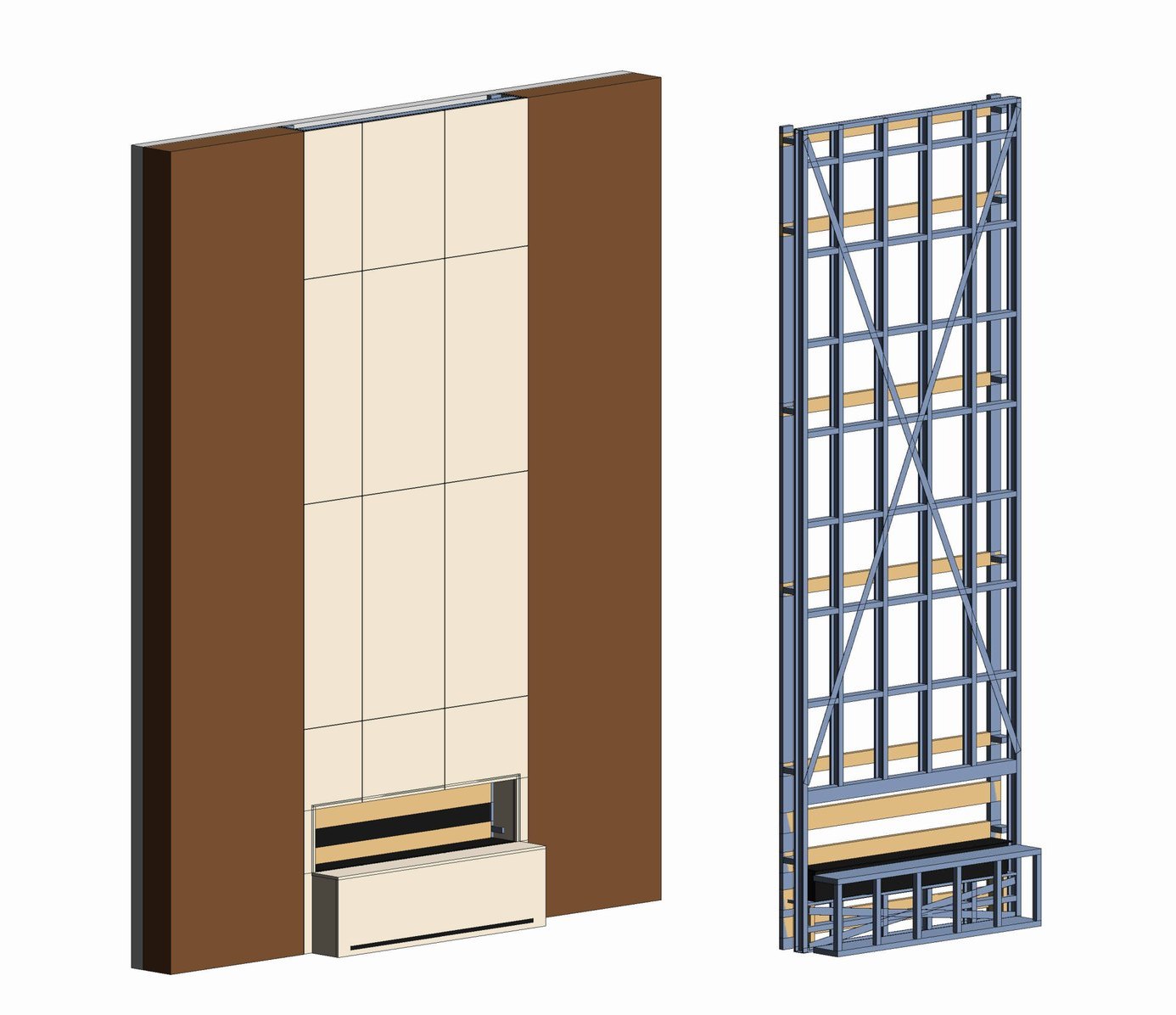
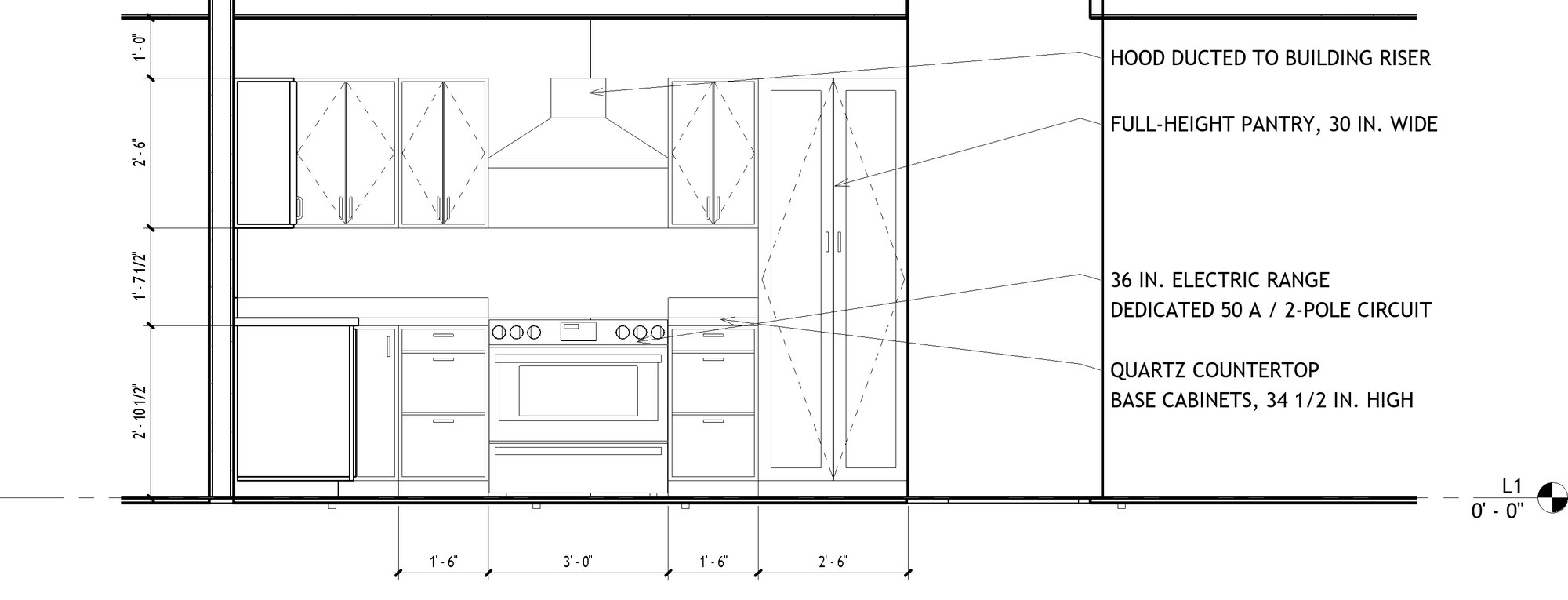
Through the JobsiteAI Revit connector the team places walls, doors, casework and fixtures, builds schedules, lays out sheets, writes notes and dimensions elevations. It exports DXF for AutoCAD and ArchiCAD users.

AEC Drawing ProductionDesign CoordinationEngineering Assistant
What you take forwardSheets, schedules, dimensioned elevations and 3D views for the owner.
Dimensioned and noted kitchen elevation produced in Revit
Real project · Revit 2027Dimensioned elevation
02 / Estimating

The low bid is the real low bid.

Estimates by CSI division from your quantities, and every sub quote leveled against one scope list before buyout.

Construction EstimatingGeneral ContractorBusiness Strategy
What you take forwardA leveled bid comparison, a scope gap register and an estimate basis.
ElectricalSub ASub BSub C
Base bid$48,200$41,900$45,600
Temporary powerIncl.+$3,800Incl.
Fire alarm tie-inIncl.+$4,500+$1,200
Permit and feesIncl.+$1,100Incl.
Leveled total$48,200$51,300$46,800
Recommended: Sub C. The low base bid ended up $4,500 above Sub C once its scope gaps were priced in.
Bid levelingSample data
03 / Codes & permits

Every review comment gets an answer.

Reviewer comments become a point-by-point response with code sections and sheet references, and every permit is tracked to the last inspection.

Florida PermittingKnowledge RetrievalIndependent Reviewer
What you take forwardA response matrix for your design professional to sign and a permit tracker.
#CommentResponse
E-1Dryer requires 5,000 VA minimum.Service load recalculated; 200 A service remains adequate. NEC 220.54
S-2Provide EOR letter for CMU infill.Signed and sealed engineer of record letter attached. FBC 107.3.4
B-3Show egress window at bedroom 2.5.7 sf clear opening, 44 in. max sill. FBC-R R310.2
Correction responseSample output
04 / Contracts & changes

Extra work gets documented, not forgotten.

Every change is classified by origin and checked against the contract. Missing paperwork is drafted before the notice window closes.

Contract AnalysisContract AdministrationFinance
What you take forwardA change log with backup and a contract issue list for your attorney.
CODescriptionStatusAmount
CO-04Owner upgrade, impact slidersSigned$12,600
CO-05Concealed rot at sill platePending$6,250
CO-07Verbal request, extra outletsNo backup$2,300
CO-07: requested by text message. Written authorization is required before the work. Change order and notice drafted.
Change order logSample data
05 / Schedule & cost

Know which job is slipping before it costs you.

Look-ahead schedules tied to procurement and inspections, with cost to date against budget and the forecast margin on every job.

SchedulingProject ManagementFinance
What you take forwardA weekly look-ahead and a budget report for every active job.
JobBudgetCost to dateMargin
Interior renovation$612,000$341,00017.9%
Tenant build-out$408,000$318,0009.2%
Addition and remodel$880,000$610,00019.4%
Tenant build-out: margin down 3.1 points since last month. Two unapproved changes drive most of it.
Budget reportSample data
06 / Procurement

Long-lead items ordered on time.

Buyout plans, submittal sequences and scope-complete bid packages for each trade, with long-lead items flagged against the schedule.

ProcurementConstruction Estimating
What you take forwardA buyout plan and bid packages ready to send.
ItemLead timeOrder byStatus
Impact windows10 weeksNov 3Late risk
Kitchen cabinetry8 weeksNov 17Shop drawings
Electrical panel4 weeksDec 1On track
Buyout planSample data
07 / Safety & quality

Safety plans built from the actual scope.

Site-specific safety plans, inspection and test plans per trade, and a punch list that drives closeout.

Construction Safety and Quality
What you take forwardA site-specific safety plan and a closeout punch list.
HazardControlStandard
Roof work, 14 ft eaveGuardrail or personal fall arrest; rescue plan posted1926.501(b)(13)
Cutting CMU and tileWet cutting per Table 11926.1153
Sewer trench, 5 ft deepCompetent person; sloping or trench box1926.652
Safety planSample output
08 / Document control

The field builds from the current set.

Revisions, RFIs, submittals and shop drawings in one register. Conflicts and superseded sheets are flagged before they reach the field.

Document ControlKnowledge Retrieval
What you take forwardOne register for every drawing on the job.
DocumentRevStatus
A103 Floor plan3Current
A103 Floor plan2Superseded
S-201 Lintel detail1Conflict with SD-04
Document registerSample data

Specialist roles describe software workflows, not licensed professionals. Tools and access depend on your setup.

03 / From an actual project

A 16-sheet pre‑submittal permit set, drafted in Revit.

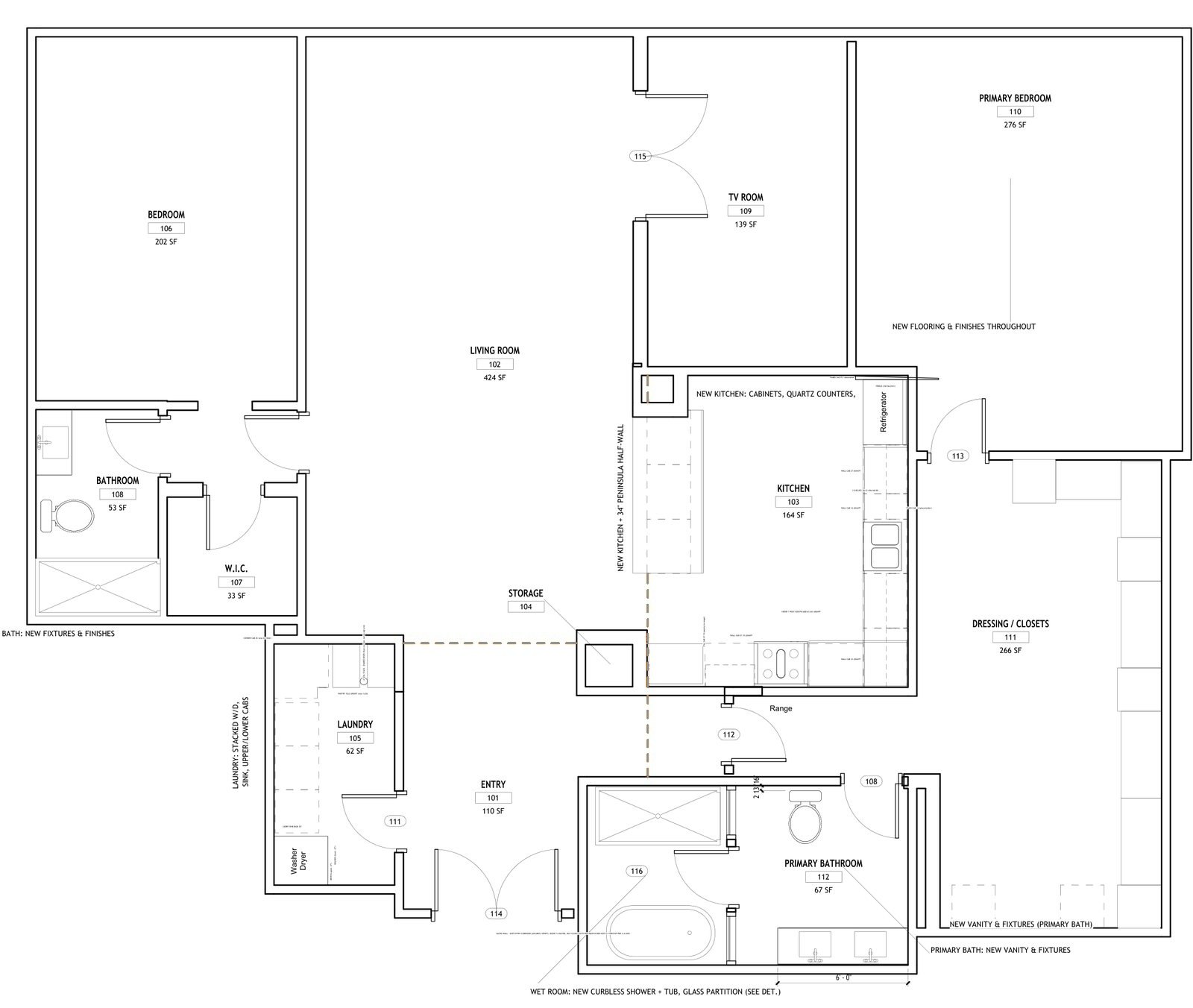
We built JobsiteAI on our own jobs before offering it to anyone else. On a full interior renovation of a high-rise condominium unit from the late 1970s, JobsiteAI worked inside Revit 2027 through its connector, alongside our project manager. The set is pre‑submittal; the design professional of record's responsible-charge review and seal come before submittal.

It set up the sheets, tagged the rooms and built the door and room finish schedules. It drafted the proposed lighting layout, the electrical notes, the panel schedule and the load calculation, with our project manager placing the devices. When the pre‑submittal peer review came back, it drafted the response matrix.

It does not replace the architect or engineer. It changes their starting point: a coordinated draft with schedules, notes and code data in place, instead of a blank title block.
16
sheets: cover and code data, architectural, details, schedules, mechanical, electrical, plumbing, structural notes
13
rooms in the model, with door and room finish schedules generated from it
58
light fixtures on the proposed lighting plan, including a 16-fixture soffit ring
29
pre‑submittal review items answered: 17 peer-review comments and 12 additional findings

Codes and engineering practices applied on this set

FBC Existing Building 2023, Alteration Level 2Occupancy R-2, Type I-B (assumed, to be field-verified)Wind: Vult 170 mph, Exposure DFlood zone VENEC 2020: 210.8, 210.12, 110.26Panel schedule and load calculationFBC-B 714 firestop systemsNoncombustible framing, FBC-B 602.2 and 603FBC-B 907.2.11.2 smoke alarmsFBC-M 504 dryer exhaustFBC Energy Conservation C503Asbestos survey and notice: FS 553.79(11), Ch. 469, 40 CFR 61 Subpart MPost-tensioned slab: GPR scan before fasteningWet room: 24-hour flood test
Responsible
charge

Where the time goes back to you. The architect or engineer of record keeps responsible charge: they direct the work, check it, revise it and seal it. What changes is the starting point: schedules, notes and code data already coordinated, so their hours go to judgment instead of drafting.

Drawings and elevations produced in Revit with JobsiteAI on real Haez projects. The condominium set shown is pre‑submittal. Client names, addresses and permit numbers removed.

04 / From PDF to estimate

Keep the markups. Build a clearer estimate.

Keep marking up in Bluebeam. JobsiteAI reads the PDF set and the markup and takeoff lists you export, and carries reviewed quantities into a priced estimate.

01

Read the source

Drawing PDFs, room data, schedules and exported Bluebeam markup or takeoff lists.

PDF · CSV · XML exports
02

Make the scope visible

Quantities, drawing references, ambiguities and missing information organized for a human check.

Quantities · Source references
03

Price the work

Reviewed quantities carried into a division-based estimate with rates, allowances and exclusions.

CSI divisions · Cost basis

An export-based workflow, not a direct Bluebeam connection. Scanned sheets, scale and extracted quantities are checked before pricing.

The basis behind the bid

A number is useful. A defensible basis is better.

Know what sits behind every line: quantity, unit rate, source and date, regional factor, allowances and exclusions.

01

BNI with regional context

Unit costs from your licensed BNI cost book, adjusted for South Florida where justified.

02

RSMeans and open cost data

An RSMeans City Cost Index cross-check if you hold an RSMeans license, plus the open CWICR cost book for line-item labor, material and equipment.

03

CSI structure, clear maturity

Organized by CSI division, with the AACE estimate class stated and contingency kept separate.

04

Supplier prices with a date

Current retail prices looked up from public supplier websites and your own quotes, each with its date.

05 / Contracts and commercial control

Read the obligations before they become a dispute.

Bring your attorney a better-organized file: clause summaries, scope comparisons and questions on payment, notices, changes and responsibilities.

The agreement

AIA A101, A201 and G702/G703 compared against your scope and schedule, with the original clause beside each issue.

The Florida context

Chapter 713 notice and lien deadlines tracked, and pay terms compared with Florida's construction prompt payment law (s. 715.12, F.S.).

The handoff

Qualified counsel receives the issue list and supporting records. JobsiteAI prepares the analysis; your attorney gives the opinion.

Contract issue list · Owner agreement, AIA A201 basedSample output
ClauseRiskIssue for counsel
§15.1.3.1 Notice of claimsHighNotice window cut to 7 days, against the A201 baseline of 21 days.
§9.6 Progress paymentsHighPayment period extended past the agreed date. Compare with s. 715.12, F.S.
§3.7.4 Concealed conditionsMediumClause deleted. Older buildings carry concealed-condition risk.
Chapter 713 · Final affidavitTracks. 713.06(3)(d): serve the contractor's final payment affidavit at least 5 days before suing to enforce a lien. The claim of lien is recorded within 90 days of final furnishing.
Before signing: 2 high-risk issues. List ready to send to your attorney.
06 / Your time, your numbers

What is a better-prepared office worth to you?

Set the sliders to your business. The estimate updates as you go.

Drawings, plan review, estimating, bid leveling, contracts, change logs
Salary plus taxes and benefits
Site overhead, rentals and carrying cost; we assume 3 weeks per review cycle
Hours back per year
Labor value
Avoided delay cost
Pro plan, 12 months−$1,788
Estimated net value per year

An illustrative estimate from your inputs, not a measured JobsiteAI result or a guarantee.

07 / Founding Member Pilot

Bring one real project. Help shape what comes next.

3Months of Pro
No subscription charge
10 firms

An invitation to ten firms, general contractors, project managers, design firms and engineering offices, to put the full Pro edition to work on live residential and commercial projects in exchange for honest feedback.

  • Setup call and onboarding on one of your current projects.
  • Revit connector installed and configured.
  • Every Pro feature, including plan reading, estimating and contract issue lists.
  • A direct line to Claudio Manhães and the Haez team that built it.
  • Nothing is charged automatically. No credit card to start. After three months, continue at $149 a month or walk away.
  • Any public case study needs your separate approval. During onboarding we only see the files you choose to share.

Tell us where the work gets stuck.

This form prepares an email in your mail app. Nothing is sent until you review it and press send.

Please do not include confidential drawings or client information. An application does not guarantee acceptance. Email instead: sales@jobsiteai.app
08 / Pricing

Start with the pilot. Stay because it pays.

Community
$0

The free toolkit, installed and run by your own team.

  • Code research and permit responses
  • Change logs and document control
  • DXF drawing production
  • Community support
Get the free edition
Enterprise
Custom

Set up, connected and trained for larger firms and multi-state work.

  • Everything in Pro
  • Your Revit templates and title blocks
  • Custom states and jurisdictions
  • Team training
  • Four hours of consulting each month
Talk to us
09 / Before you begin

Practical questions. Straight answers.

Does it replace my architect or engineer?

No. Drawings that need a seal must be prepared under the responsible charge of the Florida-licensed architect or engineer who seals them. JobsiteAI drafts under their direction and changes their starting point: schedules, notes and code data already coordinated.

Does it work with Revit and Bluebeam?

Yes. In Revit it works through the JobsiteAI connector. It reads PDFs and the markup and takeoff lists you export from Bluebeam; it does not connect to Bluebeam directly.

Is the contract work legal advice?

No. JobsiteAI organizes clauses, risks and deadlines into an issue list. Legal opinions come from your licensed attorney.

Where do my drawings and contracts go?

JobsiteAI runs inside the AI assistant you already use, on your own computer and under your own account. Your files are never uploaded to us; they are handled under the privacy terms of the assistant you choose.

Who is it for?

General contractors, project managers, designers and engineers working on residential and commercial projects. Florida is where it goes deepest; estimating, drawing production and project control work anywhere, and the IBC is covered for work outside Florida.

What do I need to run it?

A Windows PC, an account with a supported AI assistant (Claude or OpenAI Codex) and, for the Revit connector, a current Revit license. The connector is built and tested on Revit 2027. Cost data such as BNI or RSMeans comes from your own licenses. We install and configure everything on the setup call.

Founding Member Pilot · 10 firms

Your next project deserves a full team behind it.

Twenty minutes on a call, on a project you are designing, bidding or permitting right now.